Let’s say you published a new episode this morning. Someone on the team posted it to the company page (“New episode is live! 🎧 Link below”), and by lunch it has eleven likes. Four of them are from people who work here.
(I’ve done this. We’ve all done this.)
Not getting your expected engagement is a fair thing to be a little bummed about. Especially since for B2B brands, LinkedIn is where your buyers are during the workday, and where your sales team is already talking to them.
And you know your episode has plenty to offer those people; I know it too. But a one-line announcement from the company page just doesn’t give anyone a reason to stop scrolling.
Half of a LinkedIn post’s impressions arrive in its first 48 hours, according to Metricool’s 2026 study of nearly 700,000 posts. So what that means is your episode announcement post has run its course within a couple of days. If you didn’t garner your audience’s attention with it yet, you’re likely not going to.
In this post, I’m going to tell you what will get their attention on LinkedIn.
Why LinkedIn is a good fit for a B2B podcast
A B2B podcast is a way to show buyers how your company thinks before they’re ready to talk to sales. LinkedIn is where that kind of content gets taken seriously.
Marketers see it the same way. In the Content Marketing Institute’s B2B Content and Marketing Trends report for 2026 (1,015 B2B marketers), 76% named LinkedIn as one of the most effective channels for publishing thought leadership.
The context helps too. On TikTok or Instagram, your episode sits next to memes and trending audio. On LinkedIn, it sits next to your host’s job title, your guest’s job title, and the industry news everyone is reacting to that week. And when a colleague of the guest comments on the post, that works as social proof.
One check before you start: All of this assumes your listeners are on LinkedIn. For most B2B shows, they are, but it’s worth confirming. Advanced Audience Demographics shows where your listeners spend their time online, and B2B Analytics shows the companies and job functions behind them.
Now let’s get into how to promote your podcast on LinkedIn (the right way).
Step 1: Decide who’s posting
Before you write anything, decide which people and which pages will be posting.
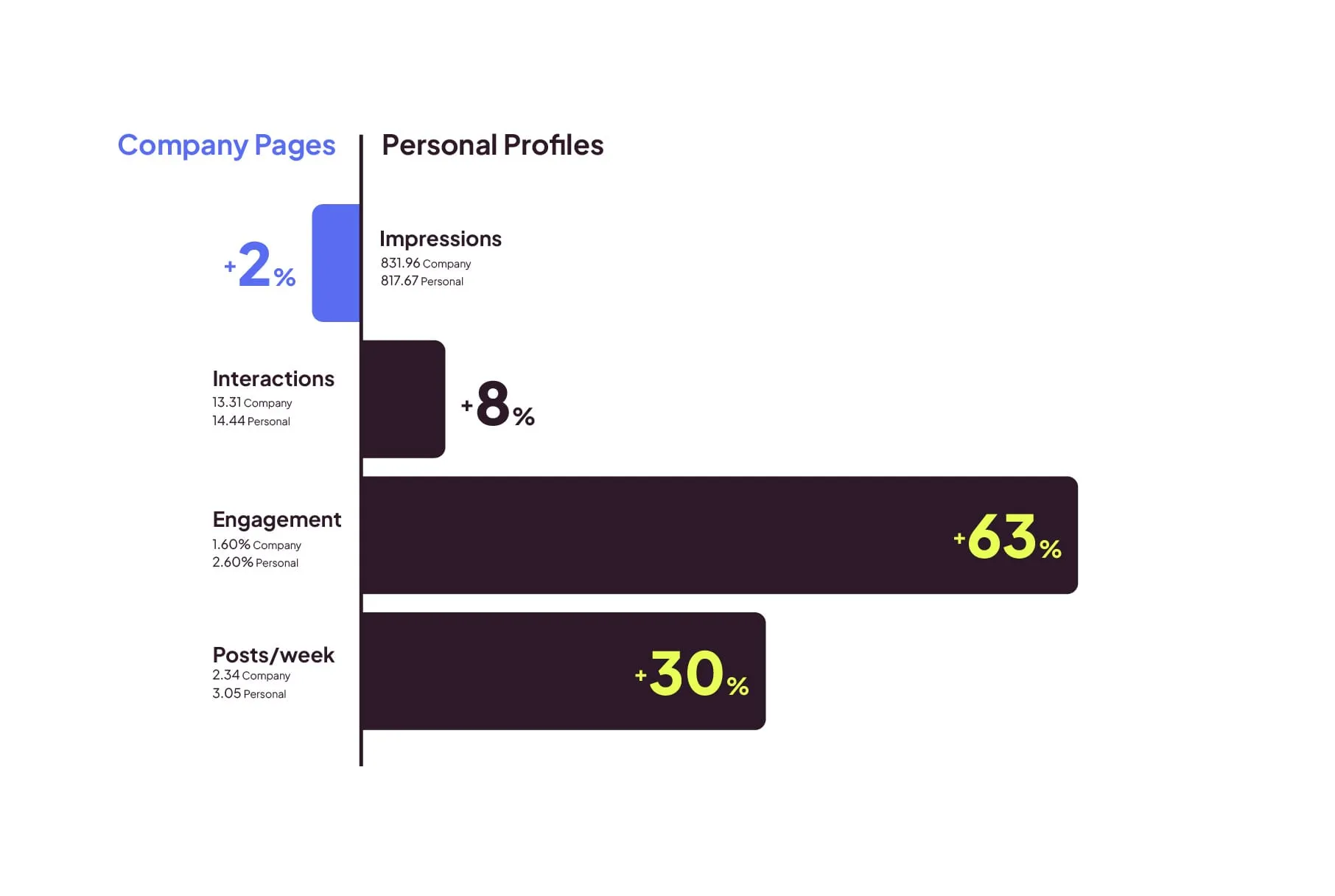
Metricool’s study looked at both kinds of accounts for the first time. Company pages and personal profiles got about the same number of impressions per post (roughly 832 and 818).
What differed was what people did next:
Personal profiles earned a 2.60% engagement rate against 1.60% for company pages, and drew more comments. However, people shared company pages more. With that, I think it’s safe to say that personal profiles start conversations and company pages spread messages.
Here’s a quick cheat sheet:
| Account | Its job | Who posts | What goes there |
|---|---|---|---|
| Personal profiles | Carry the ideas and start conversations | The host, the person who knows the most about the topic, one executive, and a salesperson or two who actually like LinkedIn (don't draft anyone who doesn't) | The take, the story, the how-to |
| The company page | Spread the message | Whoever runs the page | The episode link, a clip, reshares of what the team posted |
And I know what you’re thinking: “I try to get my team to post, but they’re all too busy.” You’re not alone. CMI’s report found that 37% of B2B marketers say fewer than 5% of the people in their company with real expertise take part in thought leadership.
Step 2: Pull the ideas out of the episode
Start with the transcript. If you host with CoHost, transcriptions are built in, or if you’re not hosting with us, our guide to podcast transcriptions covers why every show should have one and recommended ways to get one.
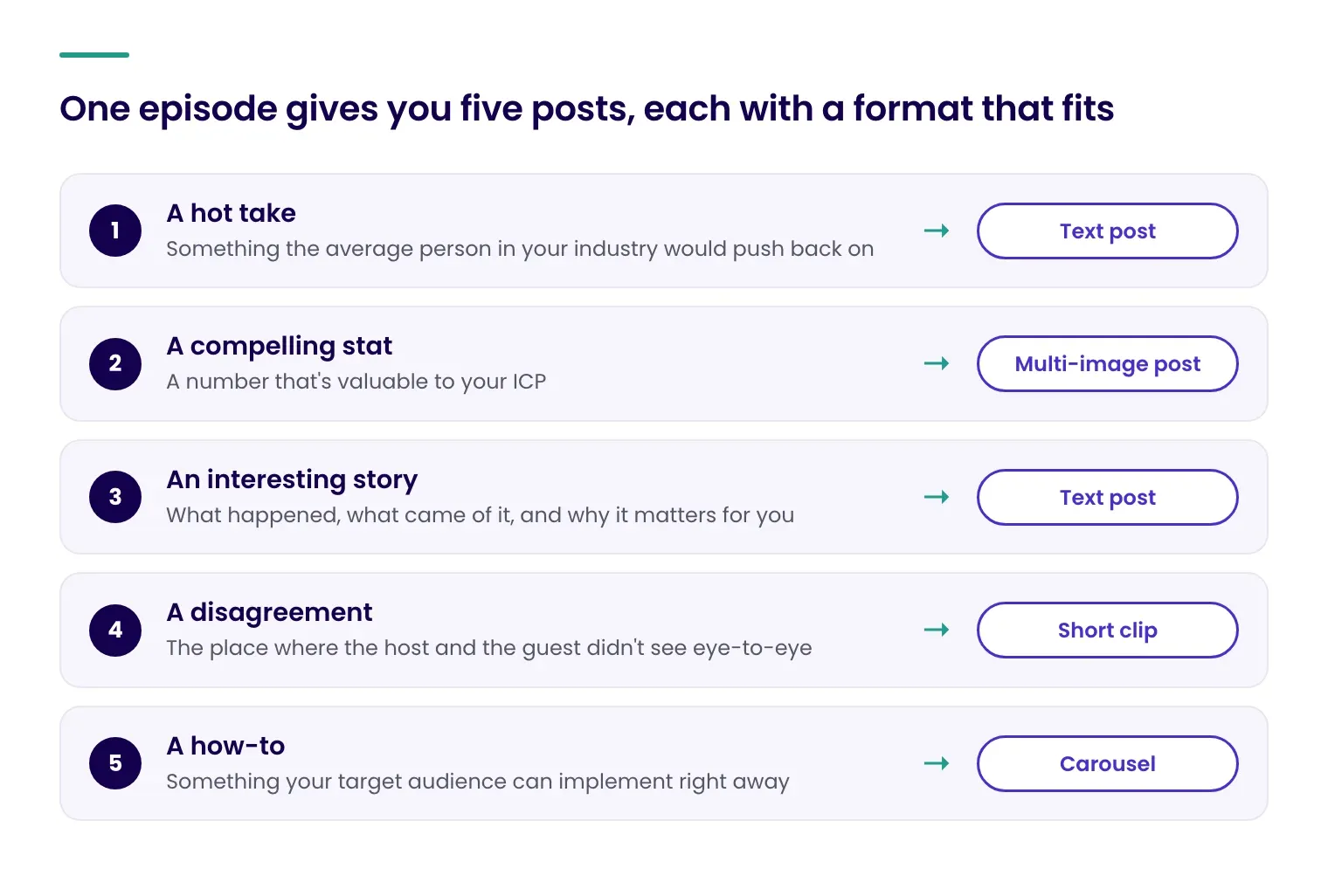
Once you have your transcript in hand, you’re going to want to flag (or have ChatGPT or Claude flag) five things, and each one becomes its own post:
- A hot take. Something the average person in your industry would push back on.
- A compelling stat. A number that’s valuable to your ICP.
- An interesting story. What happened, what came of it, and why it matters for you.
- A disagreement. The place where the host and the guest didn’t see eye-to-eye.
- A how-to. Something your target audience can implement right away.
Most episodes have all five, but most promo posts don’t leverage any of them. They use the guest’s name and a generic episode overview, which is how you end up with eleven likes.
Step 3: Choose the right format
Now that we’ve run through the ideas portion, let’s dive into what formats lend themselves best to each one:
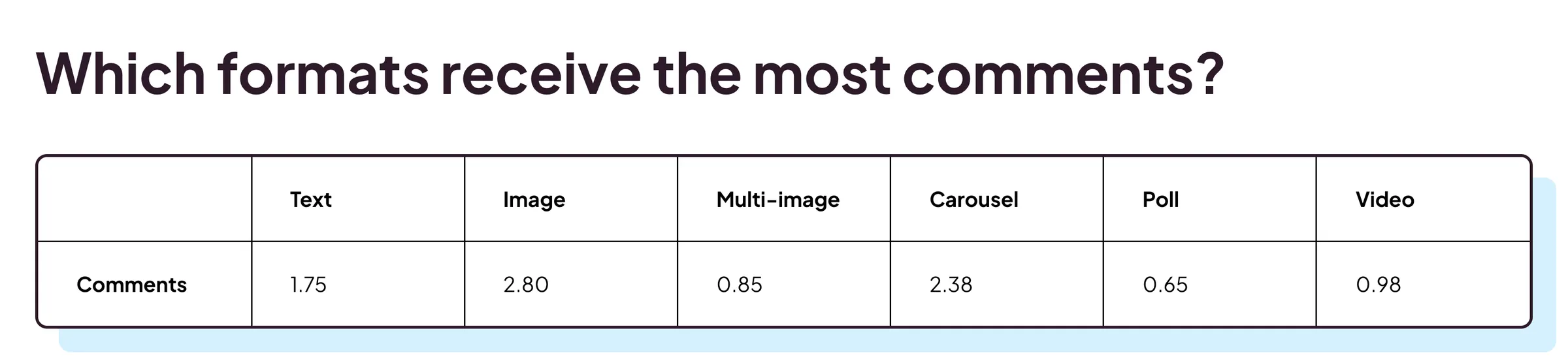
In Metricool’s 2026 study of 673,658 LinkedIn posts, multi-image posts had a 3.71% engagement rate, against 1.81% for a single image and 1.80% for video. Carousels averaged 1,451 impressions per post, while video averaged 606. Here’s how that plays out for each format:
| Format | Good for | Why |
|---|---|---|
| Text post | The hot take or the story, from a personal profile | Easy to write, and it can stand alone without a click |
| Carousel | The how-to, or "five things I took from this episode" | Reaches more people per post than video |
| Multi-image post | The stat, or quotes from several moments | More than double the engagement rate of video or a single image |
| Short clip with captions | The disagreement, or any moment where someone sounds like they know their stuff | Lower engagement than the other formats, but the only one where a buyer hears the person talk |
| Poll or question | Asking listeners what they want covered next | Polls drew the fewest comments per post in the same study (0.65), so I'd use one to collect topic ideas, not to carry the promotion |
| Quote card with the guest's photo | Giving the guest something to share | Not in the study, but it's the easiest thing to hand a guest |
So the data points to carousels and multi-image posts, and that’s where I’d start. Put the hook on the first slide, because it’s the only one most people will see unless it earns the swipe. Keep the text on each slide short, and end on a slide that says what to do next, like listening to the full episode.
But that’s not to say that video doesn’t matter. A clip does something a carousel can’t: It lets a buyer listen to someone for half a minute and decide whether they know what they’re talking about, which is the whole premise of a podcast.
And clips do send people back to the show. In Sounds Profitable’s Podcast Atlas, a survey of more than 5,000 US adults, 84% of people who watch podcast clips said clips have at least sometimes turned them into regular listeners. If you’re cutting clips, keep it to 30 to 60 seconds and add captions.
Step 4: Write the post
You’ve got the ideas and the format options. Now here’s how to write each one so it gets read.
The filter I’d run every draft through is simple: Could someone use this at work today, or forward it to a colleague?
People on LinkedIn are looking for something that makes their week easier, so a quote, a data point, or a step they can take that afternoon will go further than a description of the episode. Here are a few good rules of thumb:
- Have a strong open. LinkedIn folds long posts behind a “see more” link, so the first two lines decide whether anyone reads the rest. Lead with a strong hook, an interesting stat, or a hot take.
- One idea per post. If you feel the urge to add a second one, that’s your next post.
- End with a question. Posts with a direct question averaged 77% more comments than the typical post, and posts that asked people to comment averaged 80% more.
- Be careful with the link. This one’s more nuanced than the internet makes it sound. Metricool found that links behave differently depending on where you post them, working well for brand pages but harming personal pages.
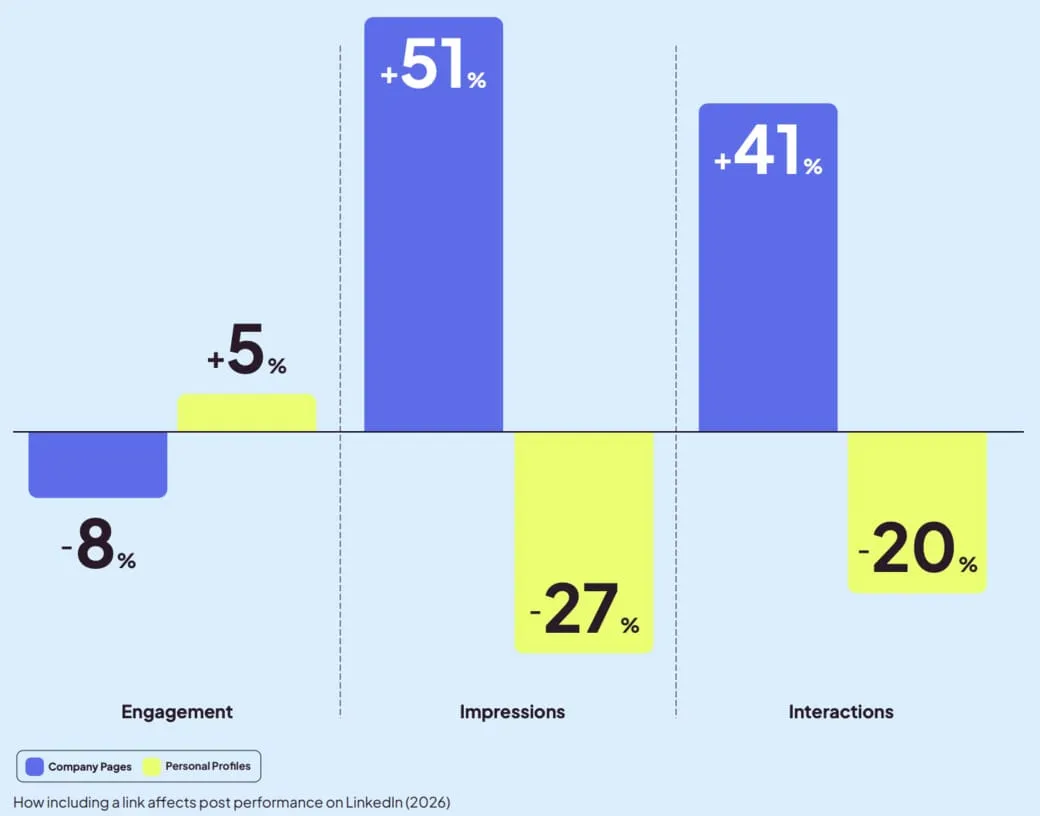
On a company page, a link to an episode is what people expect, and those posts did better than average. On a personal profile, posts with links did worse. If you want a workaround, I’d suggest putting the link to the full episode in the comments.
The easiest way to write a better post about your episode is to start with the one thing from the conversation you’d actually bring up with a prospect. Offer that insight or tip to your audience for free, and let the episode be where people go if they want the rest.
Step 5: Create a schedule
Half of a LinkedIn post’s impressions arrive in its first 48 hours, so a single launch-day post is mostly done by the end of the week. Instead of posting once and hoping, space your posts out over about two weeks.
Here’s a realistic schedule to aim for:
| When | Who | What |
|---|---|---|
| Two days before | Host | A teaser: a question or the problem your guest tackled. No link yet |
| Launch day | Host | A personal post leading with your strongest hot take |
| Launch day | Company page | The announcement, with the episode link and a clip |
| Day 1 | Guest | Their own post (the kit in Step 6 makes this easy) |
| Day 2 | Subject-matter expert | The how-to as a carousel |
| Day 4 | Host or company page | A quote card with the guest's photo |
| Day 7 | Salesperson or another teammate | The story or the stat, tagging the guest |
| Day 10 | Host | "The part we left out," or a reply to a question from the comments |
| Day 14 | Company page | A reshare of whichever post did best |
A few things to keep in mind:
- You don’t need every row. Three posts from three people will do more than nine from one.
- Do the teaser if you can. It gives people a reason to care before there’s anything to click.
- Stay in the comments. Reply, ask a follow-up, and add context the post didn’t have room for. People notice when a host, guest, or team member is actually part of the conversation.
- Keep the rhythm, change the formats. Use roughly the same two weeks for every episode, and swap in different formats, so people learn when to expect you without seeing the same post twice.
Step 6: Get your guest and sales team involved
Your own team and brand page can only reach so far. Two other groups can carry an episode much further:
- Your guest, whose network is already interested in the topic
- And your sales team, who are talking to your buyers every day.
Neither of them has time to spare, so the goal here is to make sharing as easy as possible.
Your guest
A guest’s network is full of people who are interested in exactly what they said, so this is the cheapest reach you’ll get. It’s also the place where good intentions usually die, because “please share this” sits in someone’s inbox for a month.
Make it a two-minute job. Send the guest the following as soon as the episode is live:
- A short clip of their best moment
- A quote card with their photo
- A caption written in the first person, in their voice, that they can edit
- Their own tracking link (see Step 7)
Tag them in your posts too so they can repost and reply to comments easily, since a guest who joins the conversation brings their network into it.
Your sales team
Your reps don’t necessarily have to post anything, but they’ll need to send an episode straight to a prospect, along with a reason it’s relevant. Something like: “You asked about forecasting on our call. This episode covers it.” That beats “just checking in,” and it gives the prospect something useful that speaks to their specific concerns.
Your outreach gets even better if reps can see who’s already listening. CoHost’s Salesforce integration syncs the companies listening to your show into Salesforce, so a rep can see that a target account has been playing episodes before sending that message.
Step 7: Connect it to pipeline
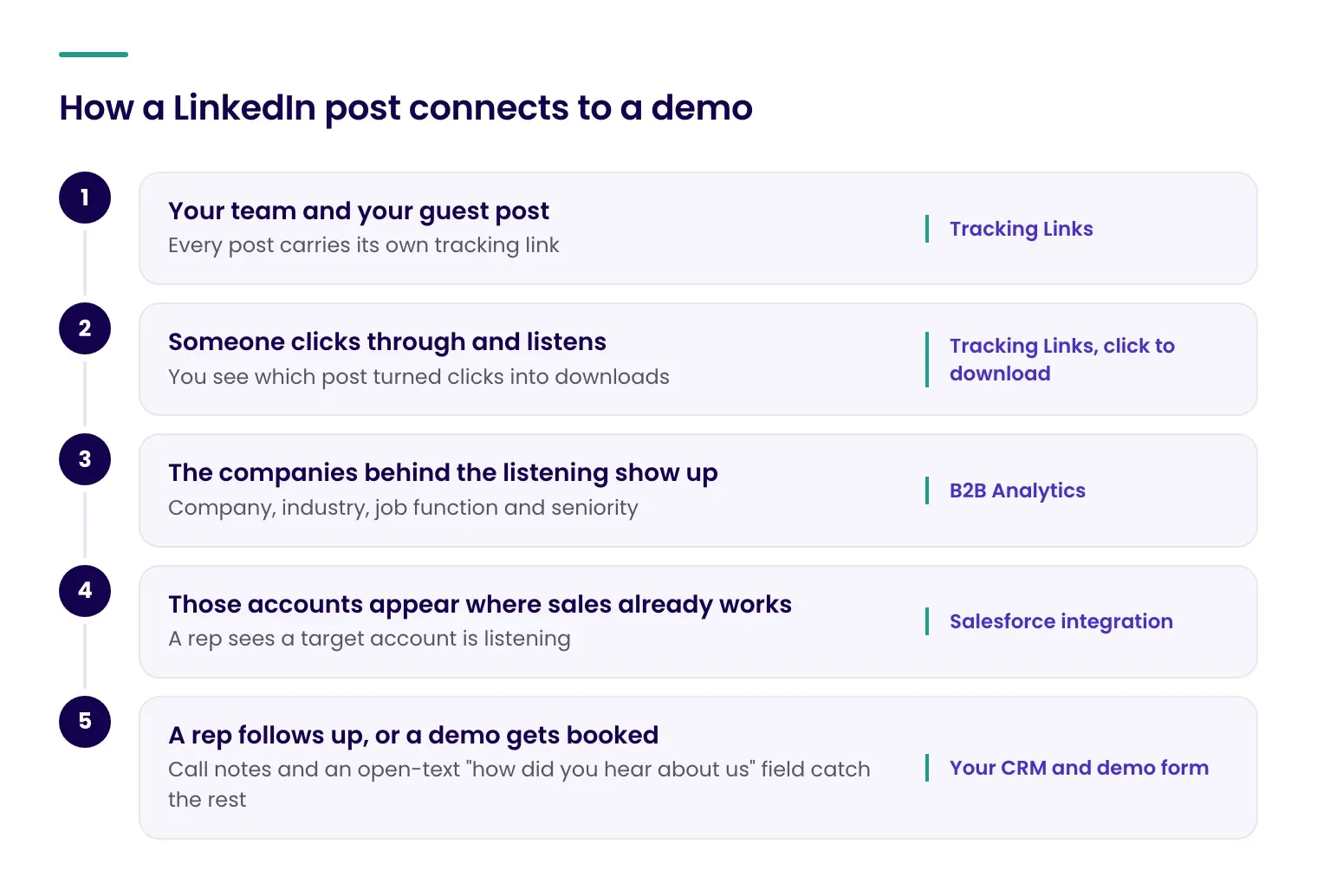
This is the one your CMO will ask about. It has three layers, and you can start on the first one this week. Here’s the whole path from a post to a demo:
Know which posts worked
Create a separate tracking link for every place you post:
- The host’s personal LinkedIn post
- The company LinkedIn page
- The guests
- The sales email
CoHost follows each link from click-through to the download, so you can see which placement turned clicks into listeners (or which leads actually listened to the episode your reps shared).
Alongside the links, jot down the number of comments, likes, and shares each post got. After a few episodes, patterns start to show (maybe story posts beat announcements, maybe carousels get shared more than clips), and then you can do more of what works.
Remember: Tracking links will undercount LinkedIn. Plenty of people see a post, think “I’ll listen to that later,” and search for the show in their podcast app. No link catches that. Treat the numbers as a rough baseline.
See who showed up
Clicks tell you about posts. B2B Analytics tells you about the people:
- The companies listening
- Their industry and size
- The job functions and seniority levels
For the month after a run of posts, open it once a week and check your target account list against it. You’re looking for a specific thing: Did accounts from the list start listening after the posts went out?
Put it where sales can see it
If the data stays in a podcast dashboard, nobody on the sales side will ever open it. The Salesforce sync moves it into the system they already use. Two small habits make the rest work:
- Ask reps to note when a prospect mentions a LinkedIn post or an episode. A line in the call notes is enough.
- Add an open-text field to your demo form (“How did you hear about us?”).
What to report to teams
Once a month, report on the following:
| What | Where it comes from |
|---|---|
| Posts published, and who posted them | Your own list |
| Clicks and new listeners by tracking link | Tracking Links |
| Target accounts that started listening this month | B2B Analytics |
| Of those, accounts with an open opportunity or a demo request | Salesforce |
One small caution: I’d write “accounts that were already listening when they booked a demo” rather than “the podcast closed this deal.” The first statement is true and holds up when someone pushes on it. LinkedIn is one of several things a buyer sees before a demo, and you’ll earn more trust by claiming a part of the story than the whole thing.
Promoting your branded podcast on LinkedIn
That’s the whole routine. Pull a hot take, a stat, a story, a disagreement, and a how-to out of the transcript. Draft the posts for the teammates who’ll share them, spread them over two weeks, and send your guest a kit. Give your sales team a reason to send the episode to the right person, and put a tracking link on every post.
Try it on your next three episodes. By the third one, you’ll have a decent idea of which formats your buyers respond to and whether any of your target accounts have started listening. And when something in your industry makes an older episode relevant again, you’ll already have a system for sharing it.
For more content like this, subscribe to our bi-weekly newsletter, Tuned In.